# Edit a client
> Learn how to edit or update client details.
Source: https://support.caspen.com/clients/manage-clients/edit-a-client
Documentation index: https://support.caspen.com/llms.txt
## Edit a client
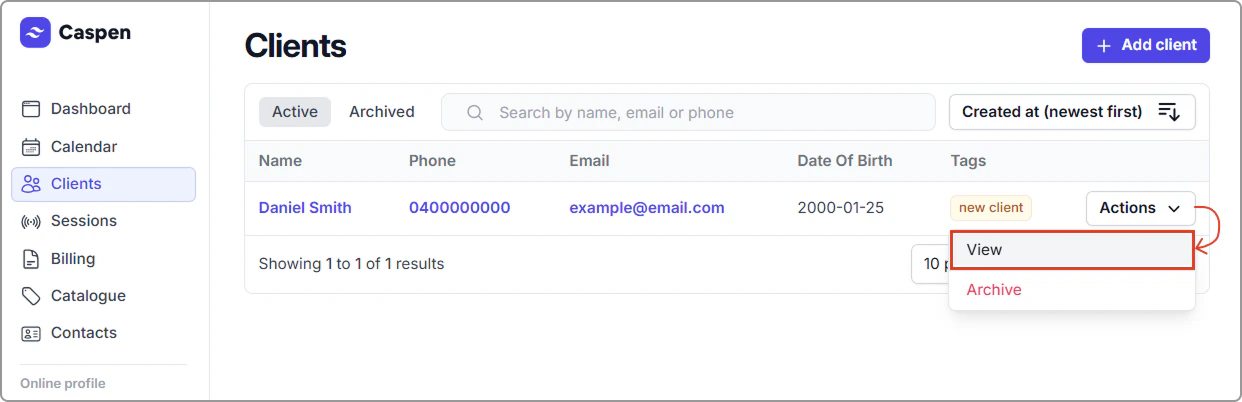
1. Open **Clients**, locate the client and click **Actions** → **View** (you can also achieve the same result by clicking the **client’s name**).
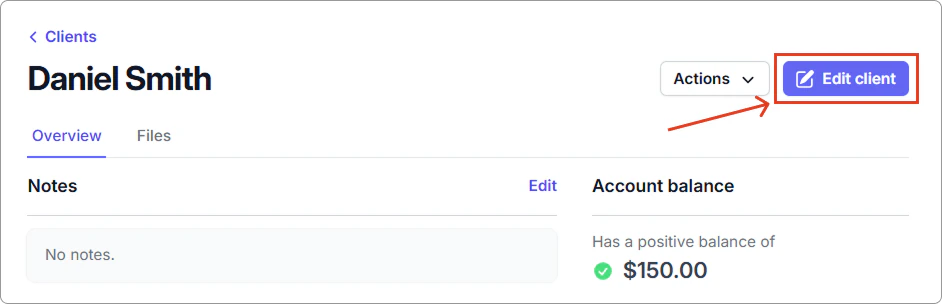
2. In the client's profile, click **Edit client**.
3. Make your changes, then select **Save** to update the profile.
> **Info:**
>
> Australia (AU) only — NDIS clients
>
> On the client profile, on the right hand side panel look for the NDIS details section and select Edit. Enter the client’s NDIS number and Fund management (Agency, Plan managed, or Self managed), then Save.
Want the comprehensive list of editable client fields? Check **All Client Fields** in the [Client field reference](https://support.caspen.com/clients/manage-clients/client-fields-reference).