> For the complete documentation index, see [llms.txt](https://support.caspen.com/llms.txt). Markdown versions of documentation pages are available by appending `.md` to page URLs; this page is available as [Markdown](https://support.caspen.com/using-caspen/catalog/activities/add-an-activity.md).
# Add an activity
Learn how to add activities to your catalog in Caspen.
{% hint style="info" %}
What are Activities?
Activities are non face-to-face items (e.g., report writing, case notes, billable communications). They do not send client notifications and are not shown in online bookings.
{% endhint %}
## How to add an activity
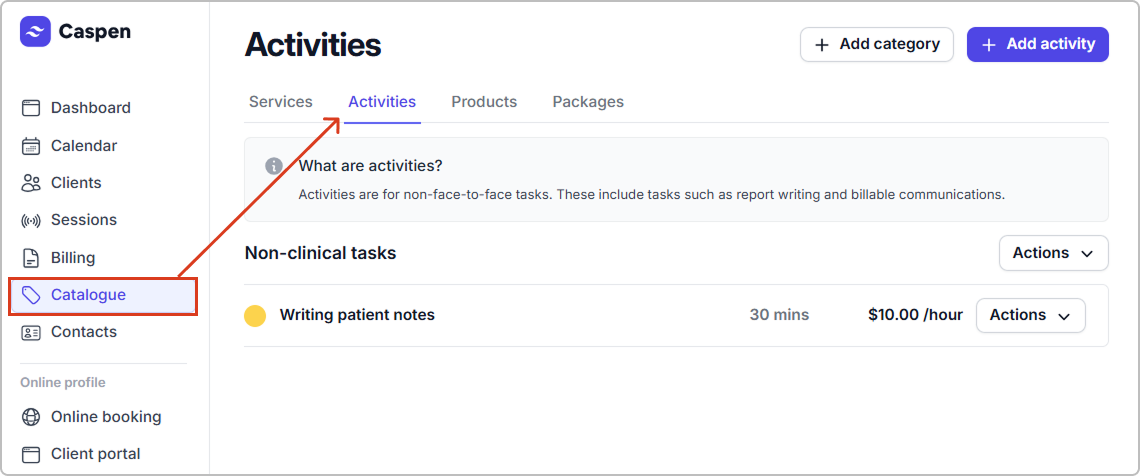
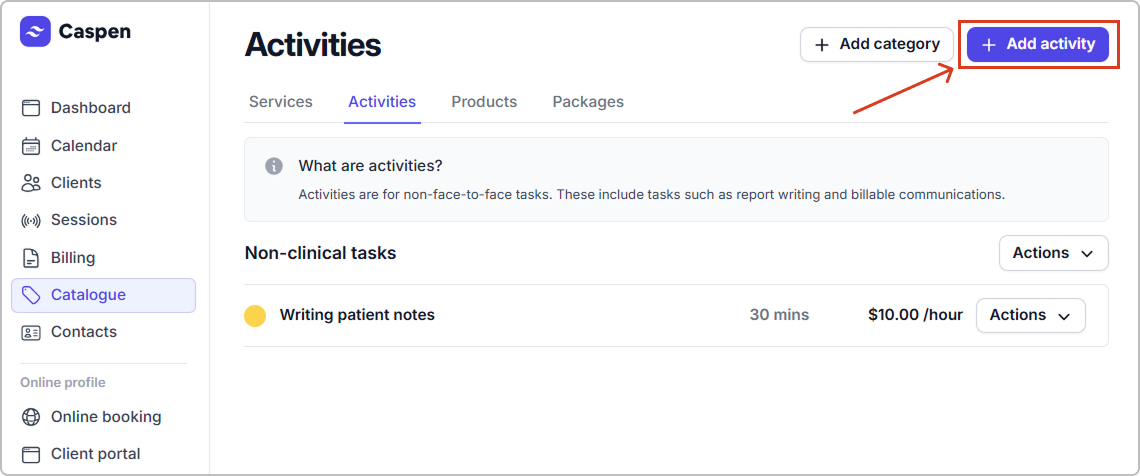
1. Go to **Catalog** → **Activities**, then click **Add activity**.
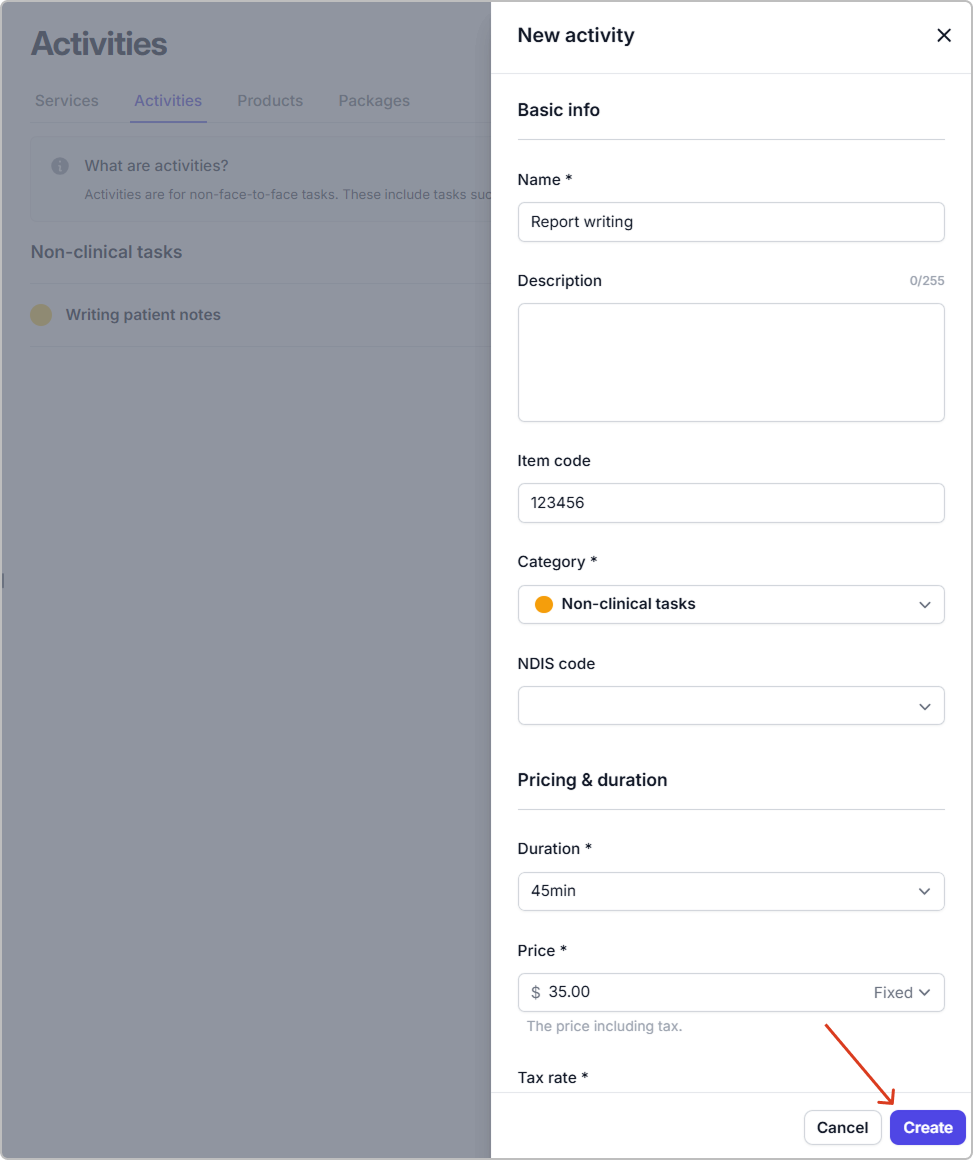
2. Enter the details (see **Activity fields reference** below).
3. Click **Create**.
The activity appears in your catalog and can be scheduled in your calendar for the practitioners and locations you selected (and added to invoices if needed).
{% hint style="info" %}
**Tip:** Assign at least one **location** and **practitioner** so the activity can be scheduled.
{% endhint %}
***
### Activity field reference
| Field | Description |
| ------------- | ------------------------------------------------------------------------------------------------------------------------------------------------------------------------------------------------------------------------------------------------------------------------------------------------ |
| Name | The activity name shown in the calendar and on invoices where applicable. |
| Item code | Internal or funding reference. |
| Category | The category this activity belongs to. Used for grouping and color. |
| NDIS code | Australia-specific NDIS related funding code. If not applicable, leave blank. |
| Duration | Length in minutes. |
| Price |
The amount you charge. Either Fixed or Hourly.
Fixed: A set price. You can still change it on the invoice.
Hourly: An hourly rate. The invoice total is based on the hours you enter.
|
| Tax rate | The tax that applies to this activity. |
| Practitioners | Who can perform this activity. |
| Locations | Where this activity is recorded. |
{% hint style="info" %}
#### Entering the price
Enter prices according to your **account tax setting**:
* **Prices exclude tax:** enter the price without tax; tax is added on the invoice.
* **Prices include tax:** enter the price with tax; the tax portion is shown on the invoice.
See **Settings** → **Taxes** to change the account tax setting.
\
**Note:** This is separate from the activity’s **Tax rate**, which sets which rate (for example 10 percent or tax free) to apply on the invoice.
{% endhint %}
***
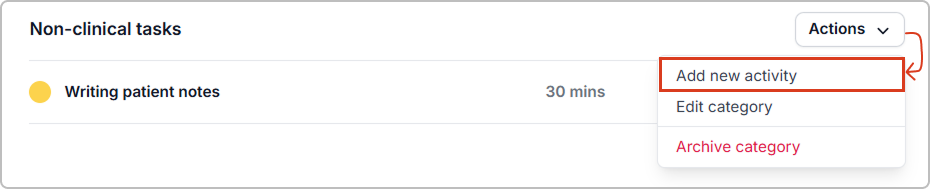
#### Quick add from a category
You can also add an activity from a category: **Actions → Add new activity**. This opens the same form with **Category** prefilled.
***
## Frequently asked questions
Do activities send client notifications?
No. Activities do not send client notifications.
Can activities appear on invoices?
Yes. If you add an activity to an invoice, its name, price, and item code (where enabled) will appear like other billable items.
What if I do not use NDIS?
Leave **NDIS code** blank. It is only relevant for Australian NDIS billing.