Migrating from Cliniko to Caspen
Transitioning from Cliniko to Caspen has never been easier with our streamlined data import process.
Thanks for choosing Caspen!
We’ve created this comprehensive guide to support your move from Cliniko to Caspen. Our team will handle the secure transfer of your data from Cliniko to Caspen, currently offered free of charge. Please note this offer is subject to change without prior notice.
This guide includes:
- Overview of data that can be imported from Cliniko to Caspen
- Before your import from Cliniko to Caspen
- Export your data from Cliniko
- Data Migration
The overview of data that can be migrated from Cliniko to Caspen:
Data included from the import ✅:
- Clients / Patients (active and archived)
- Contacts
- Appointments
- Businesses (called Locations in Caspen)
- Communications
- Client forms and form templates
- Client files
- Patient cases: Invoices and payments aren’t imported, so case balances may be inaccurate. For correct tracking update case totals after your import.
- Practitioner reference numbers
- Practitioner availability
- Treatment note templates (called Progress note templates in Caspen)
- Treatment notes (called Progress notes in Caspen)
- Users
- Custom fields
Warning
Data you will need to handle separately (NOT imported):
- Invoices and payments: You can keep managing these in Cliniko or Xero until they are fully reconciled, or re-create any outstanding invoices in Caspen.
- Body charts: Export from Cliniko if required for your records.
- Letters and letter templates: Export from Cliniko if required for your records.
- Waitlist: Not imported. After migration, set up your waitlist in Caspen.
Before your import from Cliniko to Caspen
Make sure the basics are set up in Caspen so your import runs smoothly.
Locations
- Add all locations in Caspen (leave as active), including any that are currently archived in Cliniko.
Users and Practitioners
- Create a user in Caspen for every practitioner you plan to import.
- Invite practitioners (active and archived) to Caspen.
- Ask all invited practitioner users to accept their Caspen invite before the import begins.
Info
Important Note:
If you want historic or future data for archived or inactive practitioners, they must exist as users in Caspen.
If you are not importing historic or future appointments for archived practitioners, you can skip inviting them.
- Ensure practitioners are Active in both Caspen and Cliniko.
Services
You have two options:
- Set up services in Caspen now, or
- Ask our team to import your Cliniko services for you.
Since Cliniko does not have an “activity” service type:
- Create non face to face services in Caspen as activities.
- Create face to face services in Caspen as appointments.
If you’d like us to import your services, we may ask you to confirm which services are activities versus appointments. No stress though we will help ensure everything is set up the way you like it.
Export your data from Cliniko
To export your Cliniko data you'll need to refer to the Cliniko's Helpdesk article. If you are unsure how to export your data from Cliniko, please reach out directly to the Cliniko support team to help assist you with your export.
We recommend exporting your data from Cliniko 24 hours prior to your Trial Conversion date.
Info
Important note:
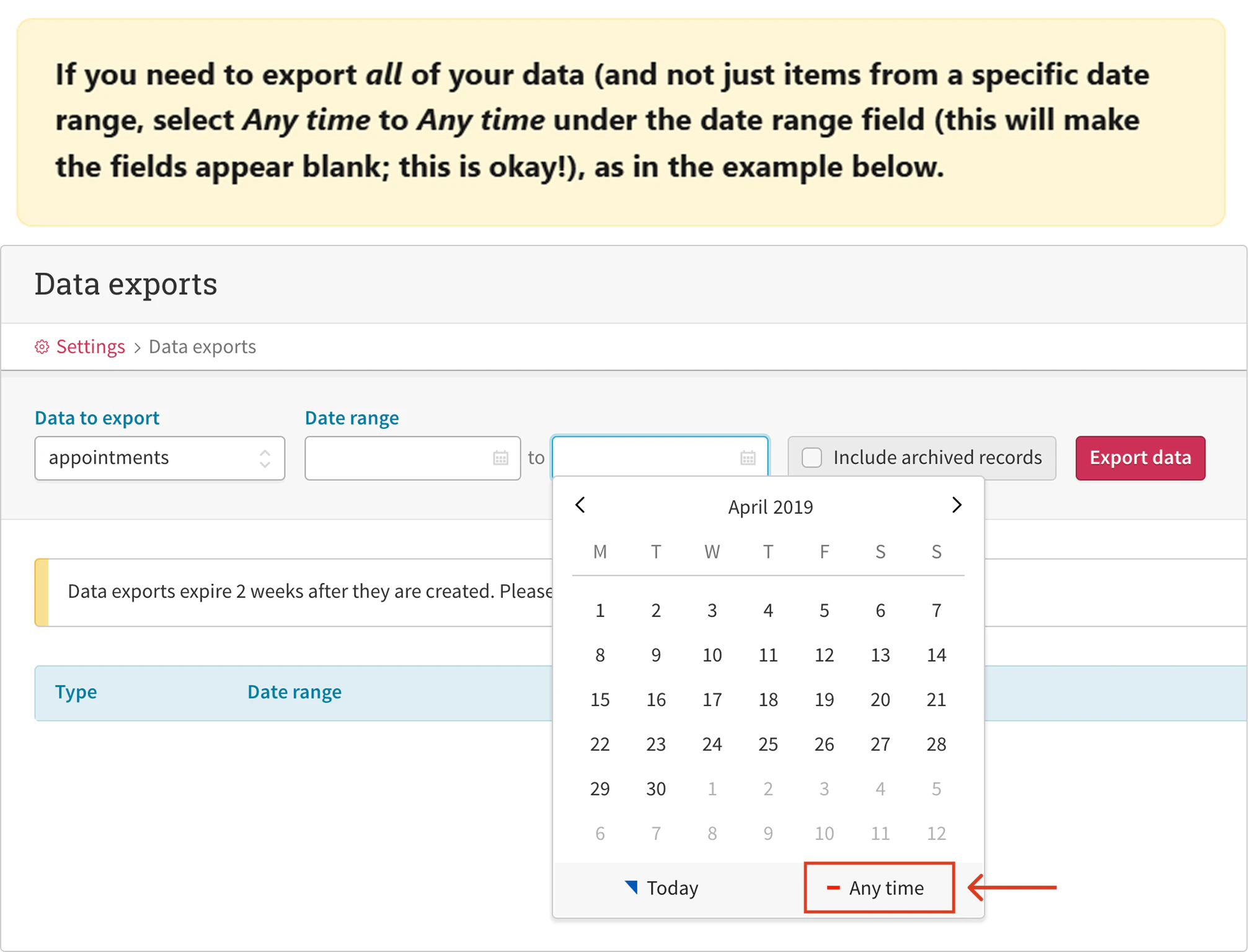
To minimise the risk of missing profiles or critical information, we recommend to export your data without date filters. Before sending it to us, confirm the extraction includes everything you want migrated. If there are items you do not want imported, let us know and we’ll exclude them during import.
To export your data, select "Any time" to Any time" under the date range field - see the screenshot below (screenshot taken from Cliniko's Helpdesk article).
Please upload the files to your preferred cloud storage service (e.g., Microsoft OneDrive, Google Drive, Dropbox) and share the data with us via a shareable link, rather than granting access to a specific email address.
If you require any assistance with this process, please don't hesitate to contact us.
Data Migration
Before we proceed with converting your data from Cliniko, we want to ensure it meets your expectations. To do this, we will first complete a trial migration for your review and approval.
- Review your data: Once the trial migration is complete, please check your data carefully to confirm its accuracy and make sure it meets your expectations.
- Approve or request changes: Following your review, if everything is accurate, we will finalise the migration. If adjustments are required, we’ll ensure they are resolved prior to finalisation.
Please note: Any data added into Cliniko after the export will not be included in your Caspen account. This will need to be entered manually once the migration is finalised.
We aim to finalise this process as promptly as possible, though the timeline may vary depending on the volume of data being processed.
We’re excited to welcome you to Caspen and are here to support you every step of the way. Please don't hesitate to contact our support team if you have any questions about the process.